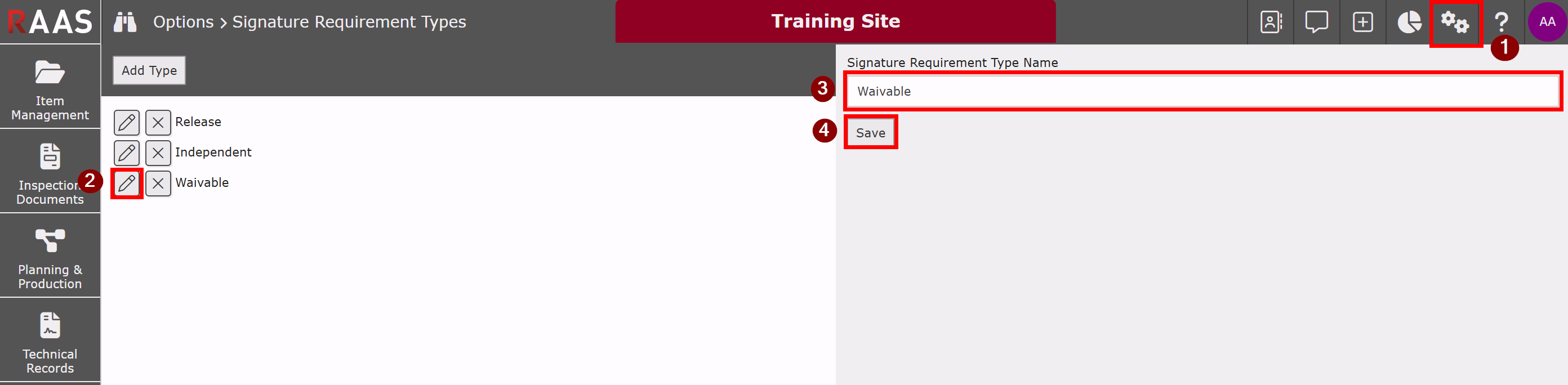
The Signature Requirement Type determines the classification of a Signature Requirement. Default types include Release, Independent, and Waivable. Users with the appropriate permissions can create additional types as needed. A user with appropriate permissions may mark a Signature Requirement as waivable; however, Release and Independent types cannot be waivable.
Adding a Signature Requirement Type:
-
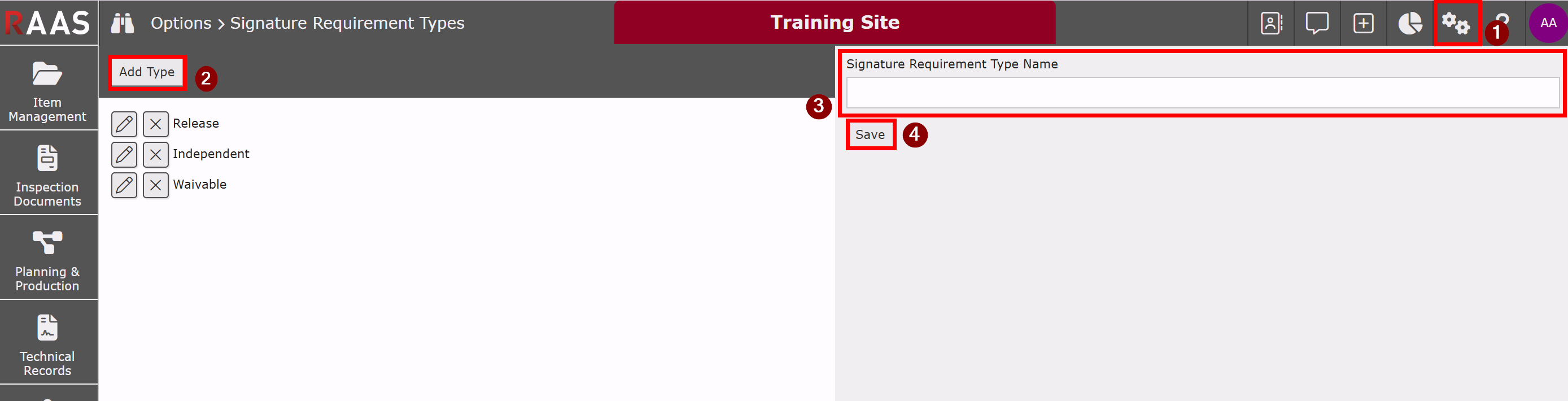
Click on the Settings menu and select Signature Requirement Types.
-
Click Add Type.
-
Enter the Signature Requirement Type Name details.
-
Click Save.
Notes:
-
Release and Independent types are system-controlled, require signature authority, and cannot be duplicated, edited, or marked as Waivable.
-
If a Waivable type is assigned to a Signature Requirement, a Waive Signature Requirement option will appear during the Signatory Selection step in the TMI Entry Wizard, allowing authorized users to mark it as Not-Applicable.
Editing a Signature Requirement Type:
-
Click on the Settings menu and select Signature Requirement Types.
-
Click Edit on the desired Signature Requirement Type.
-
Update the Signature Requirement Type Name details.
-
Click Save.